

Update on 27 June 2026: Polymarket has acquired Craft Agents, which is an open-source Claude Cowork-like agents experience, and Balint is joining Polymarket to lead product engineering. I’m making this previously paid article free, to serve as inspiration on pushing innivation in tooling. Craft Agents was built before tools like Claude Cowork were availabe, scratching the itch Craft Docs had to work efficiently with agentic interfaces, in a way that would be useful both for engineers and non-engineers.
The Christmas break is one of the rare times when my brother, Balint Orosz, founder of Craft Docs – a popular text editor known for its sleek UX – takes a proper break from work. But that didn’t happen last month: instead, he spent the holidays building AI tools and using AI agents. I assumed this flurry of activity was caused by the same “bug” that’s bitten many techies who’ve seen the recent leap in AI agents’ performance.
On the first Monday of this year, Balint returned to Craft with a new AI tool they’re calling “Craft Agents”. It’s his take on a more opinionated Claude Code, built on top of the Claude SDK. The company has mandated every engineer and non-engineer to try adding the new tool to their workflows – and they say the results have been jaw-dropping. The tool is open source; you can check it out here.
During January, the Craft team has completely changed how they work, and now feel more productive than ever. Also, non-engineers are hooked on using AI with Craft Agents.
Is it a sign of how mature startups in tech are changing how they build software, using AI tools? That’s one topic tackled in this deepdive.
First, some background. Craft has more than 1 million active users, over 50,000 paying customers, and an engineering team of 20 with a median tenure of nearly four years. They care deeply about engineering excellence and product quality: the startup won Apple’s Mac App of the Year award in 2021, and built their own, custom rendering stack to boost user experience above the competition.
Craft’s AI-first makeover is not a “YOLO” (you only live once) approach like a young startup might try as a way to create some hype. It’s an experienced engineering operation deciding that AI tools have reached an inflection point which means the company needs to change how it works, or be left behind.
My family ties to Craft mean I’m “in the loop” on things at the business, and it’s this insight that makes me confident this is worth looking at. Balint shares details below that are relevant for anyone in tech currently wondering how “AI-native” startups work in the age of AI, which aren’t AI labs or AI vendors.
Today, we cover:
Three years of AI experimentation with no “stickiness.” The engineering team was an early adopter of AI, but consciously avoided the “Copilot temptation” of shipping substandard AI features which lack true purpose.
Unexpected breakthrough: a “visual Claude Code” experience. Nontechnical users of Craft were struggling with a terminal experience, so Balint imagined what Claude Code with a UI and strong opinions” would look like. He then built this vision in two weeks using Claude Code.
How non-engineers use “visual Claude Code.” Customer support: the heaviest user of Craft Agents and Craft could soon ditch Zendesk, as a result. Marketing: building webpages with zero engineering input. HR: building new Bamboo HR integrations on their own.
New way to build software? Fast iteration without code reviews, rejecting pull requests but “weaving in” their ideas, and not using SDKs much in development.
Dramatic change in dev teams. Difficult migrations take a week instead of months, one-person responsibility squads, while some devs struggle with fast change, and even quit.
AI changes software that’s worth paying for. Enterprise-only capabilities could become standard consumer-grade offerings, and AI makes it easier to switch vendors. For example, Craft may soon pick an API-first vendor, instead of using Zendesk.
Predictions for the tech industry: the death of pull requests for open source, the rise of “remixing”, devs who value impact the most will thrive, and perhaps hiring freezes while companies figure things out.
Note: I have no financial affiliation with Craft Docs, own no shares in the company, and have not been paid to write this article. Obviously, there are family ties, which in this case enabled me to convince him to share more details than he originally intended! More in my ethics statement.
If Balint’s name is familiar, it’s because we did a podcast episode covering his unconventional, design-first engineering approach at Craft. You can meet Balint and myself at The Pragmatic Summit, coming up on 11 February, in San Francisco.
1. Three years of AI experimentation with no “stickiness”
Craft is a tool for docs, notes, tasks, and anything else to do with capturing ideas. Launched in 2020, its signature characteristics are low latency, high performance, seamless movement between devices (iPhone, Android, iPad, Mac, web, and Windows), and a delightful user experience.
The team has long experimented with AI while avoiding the hype by refusing to ship AI features that would be gimmicks at best. Below is a timeline of their AI-related activity:
2022: basic AI assistant
They launched an AI assistant, “Craft AI Assistant”, two days before ChatGPT launched in 2022, and weeks before Notion’s own AI assistant became available. That early assistant was pretty simple:
Used OpenAI’s GPT-3.5 API
Ran on an AWS gateway acting as an authentication proxy
Used HTTP streaming resources
It was also limited: the context window was only 4,096 tokens and prompts needed to be squeezed into that limit. The assistant was also “one-shot”: users asked a question, it replied, and that was that! There was no more dialogue.
The AI assistant drove substantial user growth. Many users downloaded Craft just to play with it, but it quickly became obvious that the assistant was not “sticky”, which means it was simply not genuinely useful for enough users. After an initial engagement spike, people didn’t use the AI assistant repeatedly.
2023-2024: resisting “Copilot everywhere” slop temptation
The team kept experimenting with ways to add AI features that were useful for Craft, and ran experiments such as knowledge-based search using RAG, summarization, and other retrieval features. But nothing really stuck with users.
Balint was keen to avoid the “Copilot fail” moment he observed at Microsoft, where the tech giant rolled out the not-particularly-useful Copilot across its entire product suite, only for customers to quickly come to associate the shiny new Copilot with uselessness. Balint said:
“We knew we had one shot at showing users that AI is useful for them. And until we had a ‘wow’ moment ourselves, we would not go all-in on AI. We didn’t want Craft to have the same negative associations with AI as Copilot has”.
During this time, the company did a lot of experiments. In September 2023, they held an in-house hackathon focused on AI, for which I was a judge. As I recalled from the experience:
“This [hackathon] was one of the best I’ve seen, with around 80% of staff taking part, including designers, product managers, and customer support representatives within engineering teams. The winning team consisted of some customer support folks and engineers, who built tooling which improved the customer support team’s workflow by solving some persistent pain points.”
There was no shortage of enthusiasm, but that by itself doesn’t create a great user experience.
December 2024: reasoning models mark turning point
Little over a year ago, Balint rolled his sleeves up and spent two weeks experimenting with the latest reasoning models at the time, like OpenAI’s GPT-4o.
This led to his first “wow!” moment as a software engineer with the 4o model. A highly requested user feature was for Craft to recognize shapes which users draw by hand. This was a problem Balint estimated would take a few weeks to properly implement. So, he gave it a go with the 4o model and to his amazement was able to implement it within a day by learning on the 4o model. The feature was shipped, users approved, and it marked the first time Balint had to admit they couldn’t have shipped a feature without AI.
After that, Craft’s approach with AI became more ambitious. He assigned five senior folks from among the 20 engineers to experiment fulltime with how AI could be added to the product. They spent six months building a mobile-first agent called Chaps, similar to Peter Steinberger’s very popular Clawd bot, which ultimately was never released to the public.
By October of 2025, Balint concluded that agents had started to work pretty well, but they still weren’t ready to be a standalone product. Meanwhile, the five-strong team had built up knowledge about tool calling and orchestration, which they ported back into the Craft AI assistant.
In December 2025, Craft’s AI assistant got large updates which took it from being a “meh” experience for most users, to one which was helpful and popular. This new, improved AI was a lot more “sticky”, but still wasn’t the “wow!” experience Balint wanted.
2. Unexpected breakthrough: a “visual Claude Code”
That month, Balint wanted to use more top-tier models like Opus 4.5, via Claude Code, so he built a prototype terminal UI (TUI) on top of the Claude Agent SDK: a framework for building production-ready agents with Claude Code as a library.
This tool, named Craft Terminal, connected Craft Docs as a data source to Claude Code via the Claude Agent SDK, and worked surprisingly well. Balint used it to organize his own messy Craft Docs workspace, search in it, and ask for insights. It worked really well; much better than any previous knowledge base lookups the team had built.
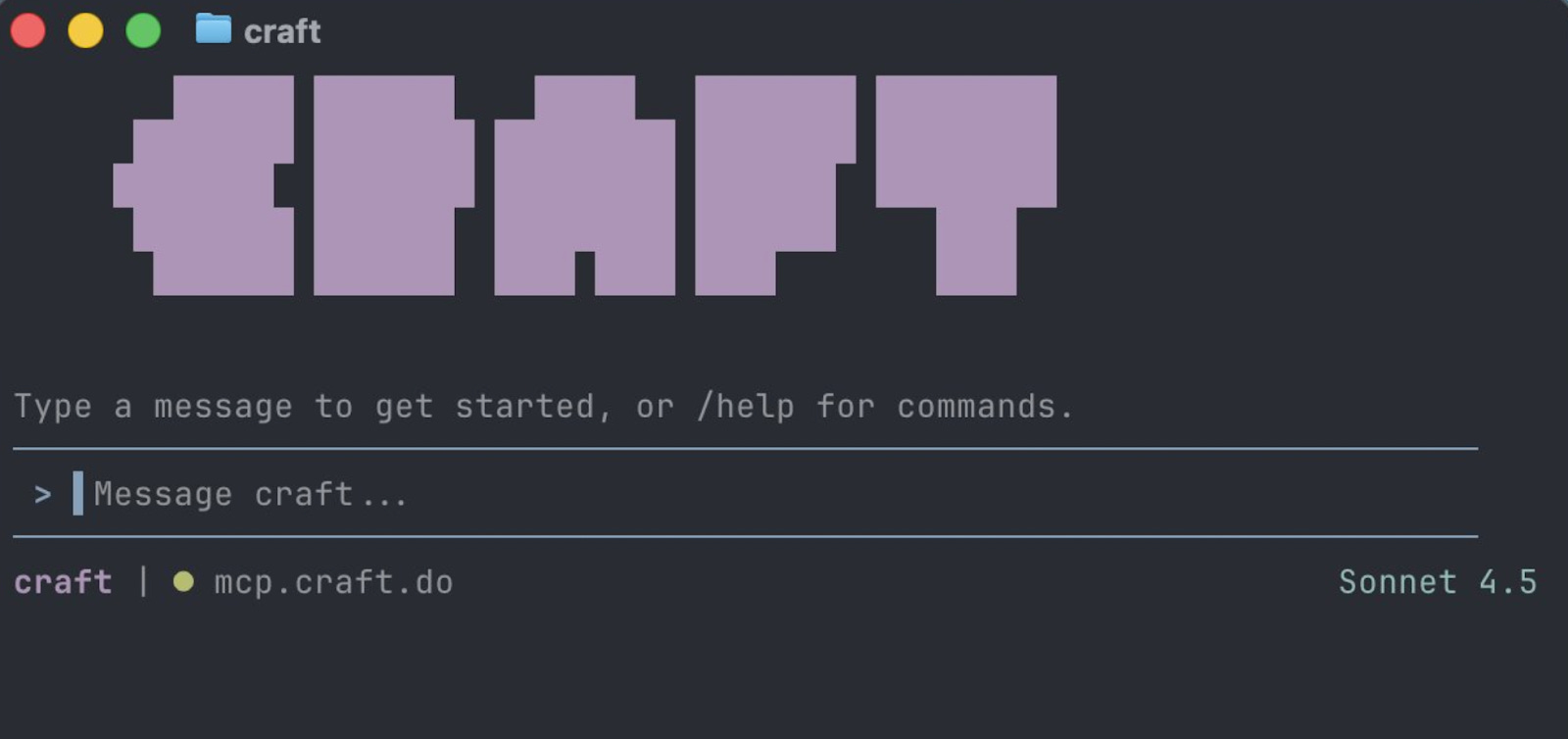
The customer service team started using the Craft Terminal, but needed more sources than just Craft Docs for their work. A typical Customer Service flow resembles this:
Look at an incoming Zendesk ticket
Check if there is a runbook for this type of ticket in Craft
Run the runbook, and often access other databases
Balint added the concept of “Sources” to the Craft Terminal: the ability to add other data sources – APIs, databases, MCP servers – on top of Craft Docs. The customer service team then started creating automations for common support tasks like sending discounts to emails on academic domains. The implementation of using APIs for sources is pretty clever: an API source acts like an MCP server to the agent, but Craft Agents hijacks the request and adds the credentials needed without the agent having access to those sensitive credentials.
However, the terminal interface was not beloved by Craft’s users. On December 18, he shared the Craft Terminal Agent with 15-20 external beta users. Feedback was positive and they liked it, but there were complaints about the terminal environment:
Multitasking was painful
Reviewing complex plans was awkward
The whole experience felt “locked away” to most users who are non-technical and not developers
As a designer and UX lover at heart, Balint felt the terminal was holding the tool back. He asked:
“Can we turn the terminal into something that’s more like an email client or a Slack client? Something that is more natural to use for anyone.”
So, last Christmas during the holidays, Balint decided to build a UI on top of Claude Code – and gave himself two weeks. Previously, it took him up to four months when he started Craft to build a v1 of Craft Docs that felt good. But this time, he did it all with AI, using Claude Code. As an additional challenge, he used Electron to build it, a tech stack he’d not used before.
Embarking upon this project, Balint decided that if he could build a polished application in an unfamiliar tech stack within two weeks, it would be proof AI was capable of delivering a step change for Craft. If so, he would push everyone at work to start using AI coding tools. If the project failed, at least he would still learn about these models’ progress.
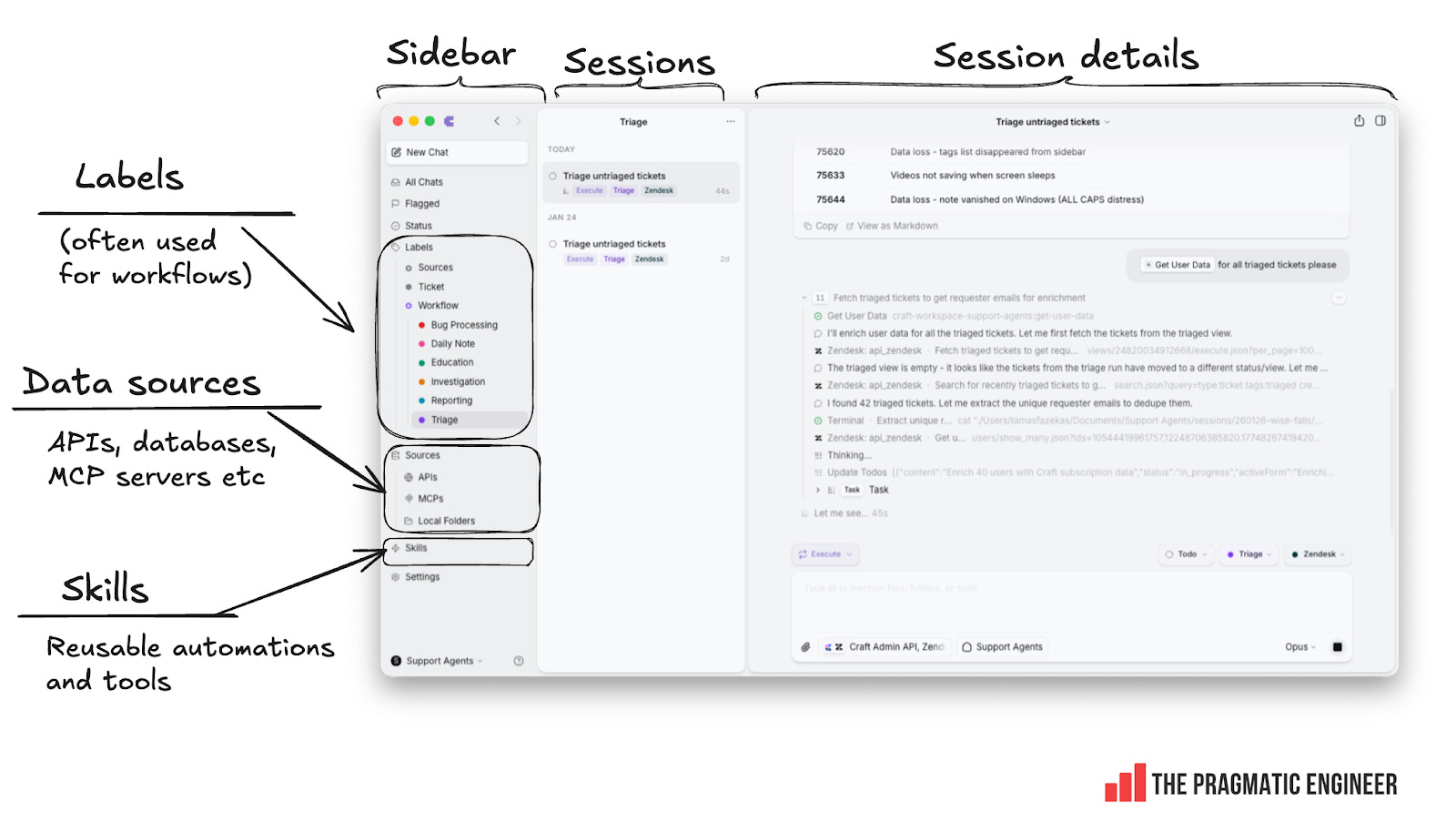
In the end, Balint hit his self-imposed milestone: by January 5 of this year, he had completed a polished Craft Agents app that ran on Mac, Windows, and Linux, thanks to it being built on top of Electron. The result is a far more friendly experience of using Craft Docs. Below is how it looked with the terminal interface reimagined as a more “email-like” UX:
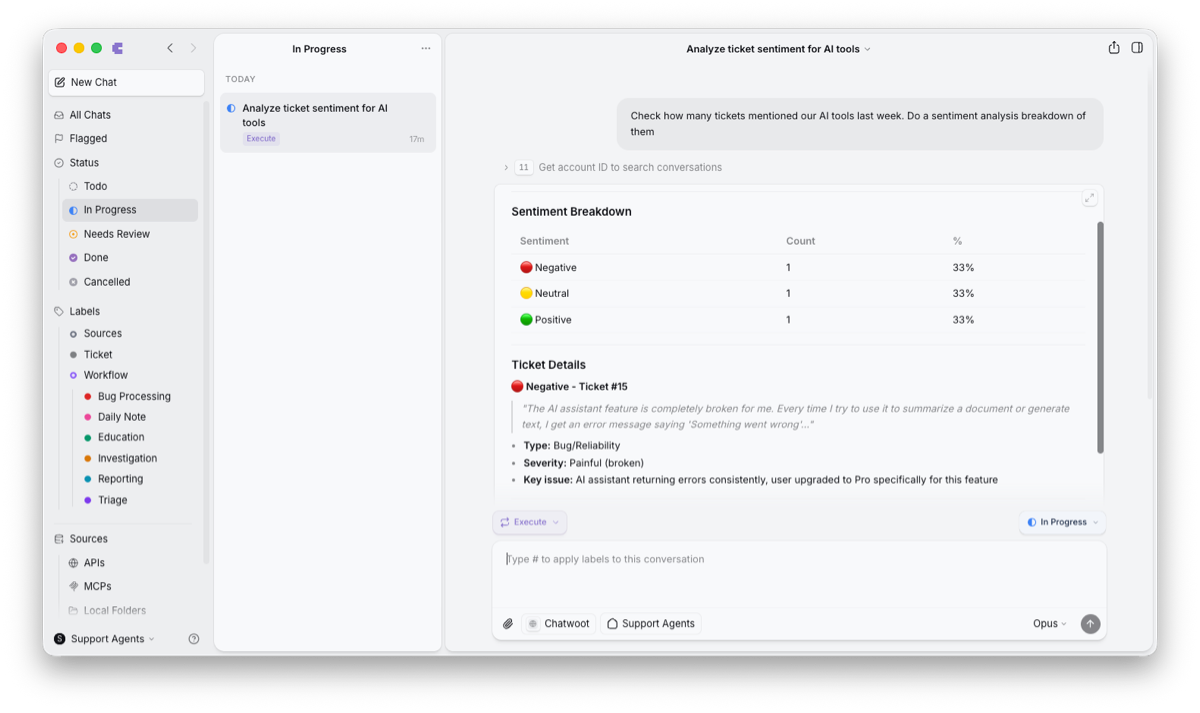
This tool was more than just a nice UI on top of Claude Code. Balint also included:
A concept of “sources:” data sources to connect to the agent; anything from databases, through to APIs and MCPs.
Support for running parallel agents, visualization, and switching between them.
Support for workflows via a label system.
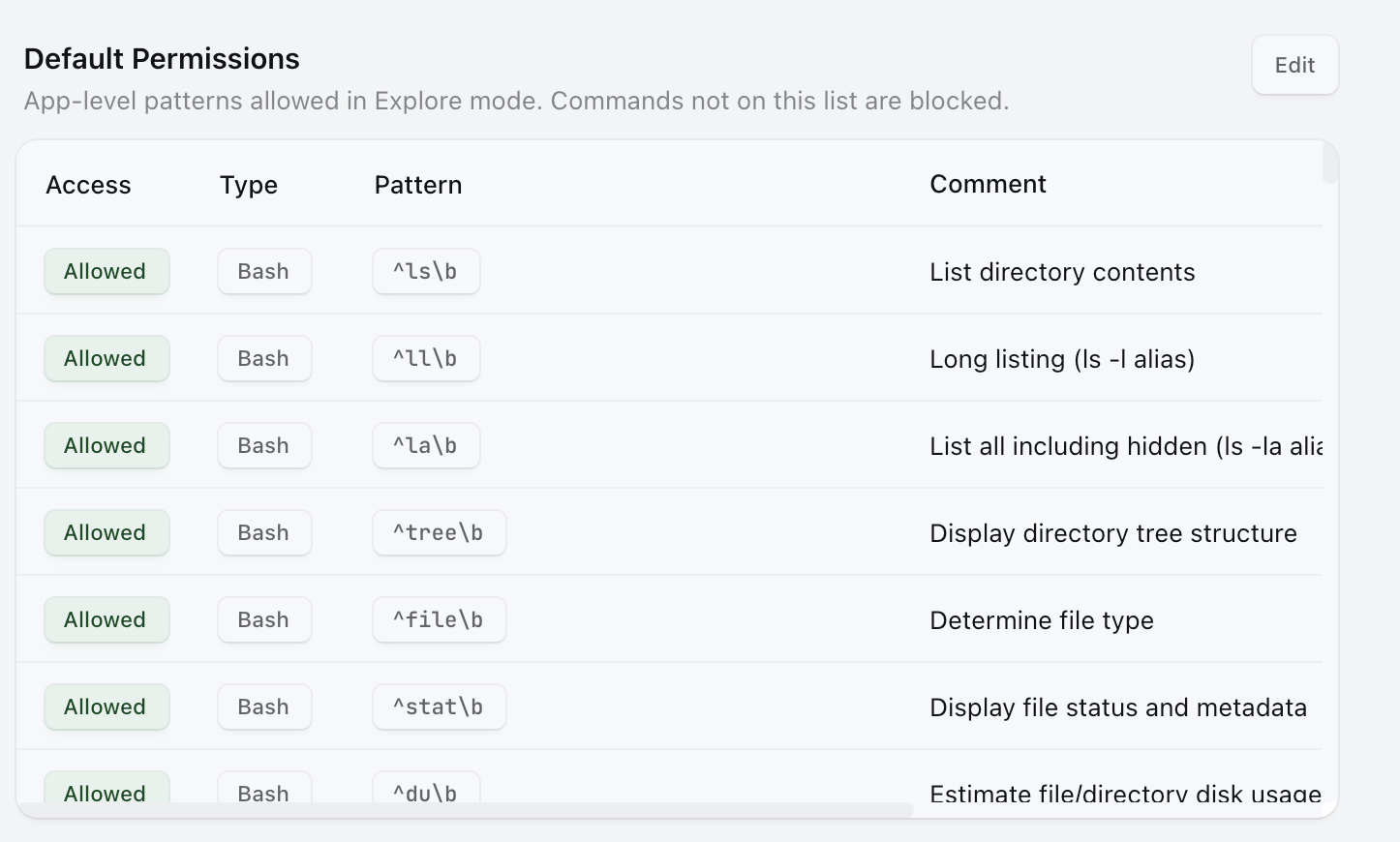
A permissions system defining whether data sources can only be read, or if they can also be written to. A readonly agent run mode, “ask to edit” mode, and a mode for making edits without asking.
Expanding Claude Code’s “skills” concept.
Theming options for the tool (added because there was time to spare at the end).
Internally, Craft Agents was an instant hit. During release week customer support, marketing, and HR all jumped on the tool, and people started automating previously manual tasks. In an unexpected development, non-technical folks started using Craft Agents more than devs!
Most devs were satisfied with Claude Code’s interface, and a few started to use Craft Agents because of the nicer multitasking (with parallel chats), and the interface being much easier to scroll, read, and view for things like long code changes.
On 19 January – almost exactly a month after the first line of code was written – Balint open sourced Craft Agents under the Apache License 2.0.
3. How non-engineers use “visual Claude Code”
I wanted to understand why Craft’s non-engineering teams have been so enthusiastic about using Craft Agents, and what’s changed as a result. As mentioned, the biggest adopters have been in customer support, so I sat down with Tamas Fazekas, head of customer support at Craft, who explained:
Custom workflows are the core of the team’s usage. They’ve built workflows for:
Bug triaging.
Bug processing: incoming user reports are run through the Craft source code for validation, for efforts to identify root causes, and to add context for the engineering team.
Daily updates which summarize the work done by a user.
Education: institutions can use Craft Docs for free. This workflow checks if a domain is an academic one. It approves legit domains and flags up fishy ones or request patterns.
Let’s take a look at a few workflows using this tool:
Triaging workflow with agents
Parallel agents are helpful for processing triage tasks in bulk. When there’s a large number of customer tickets, the tool automatically kicks off parallel agents to go through triage:
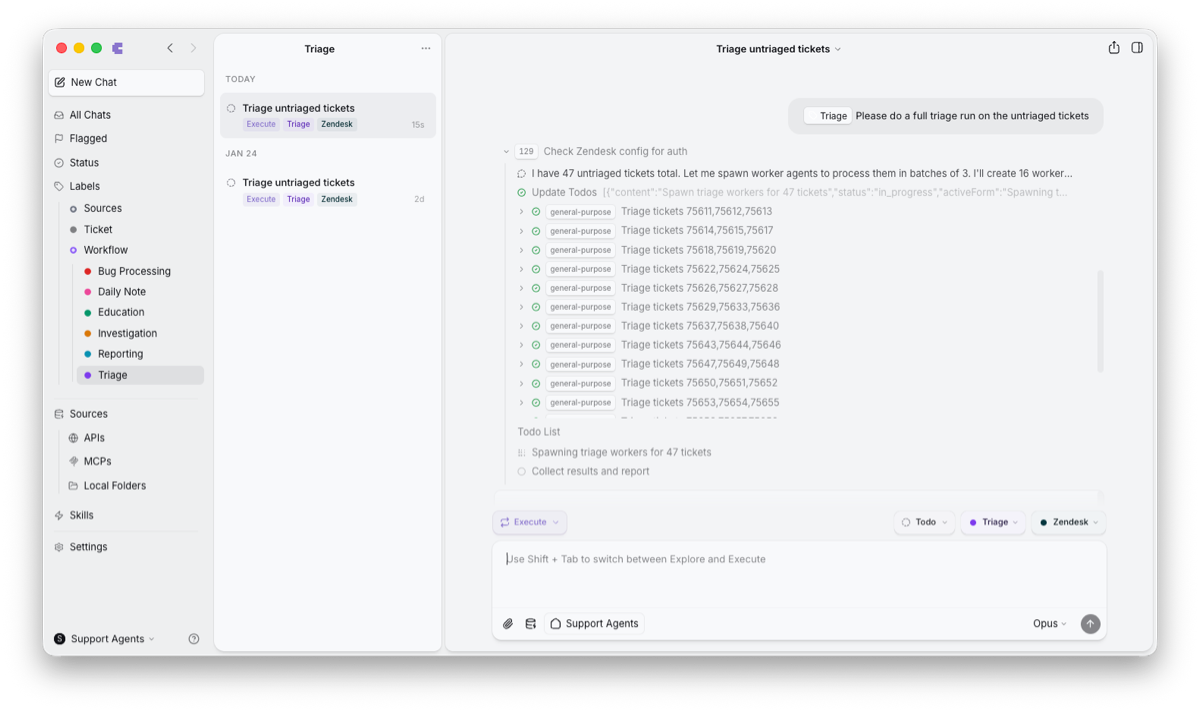
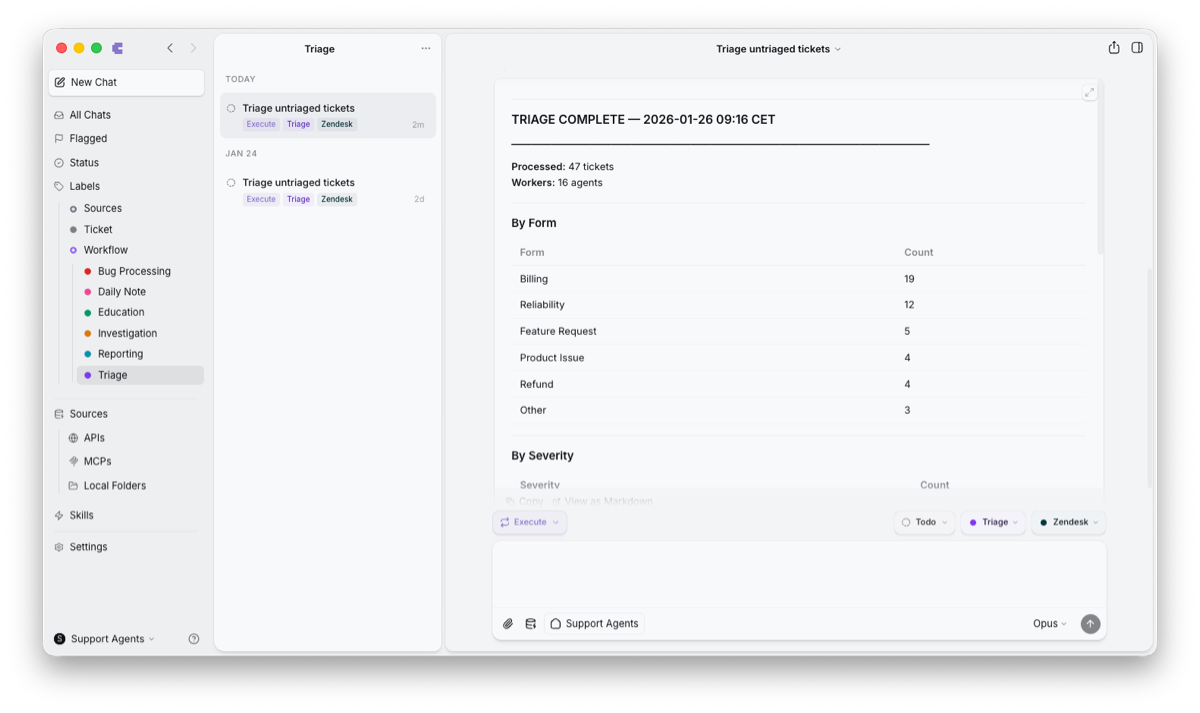
When triage is complete, the agent provides a report to the customer support person who kicked off the work.
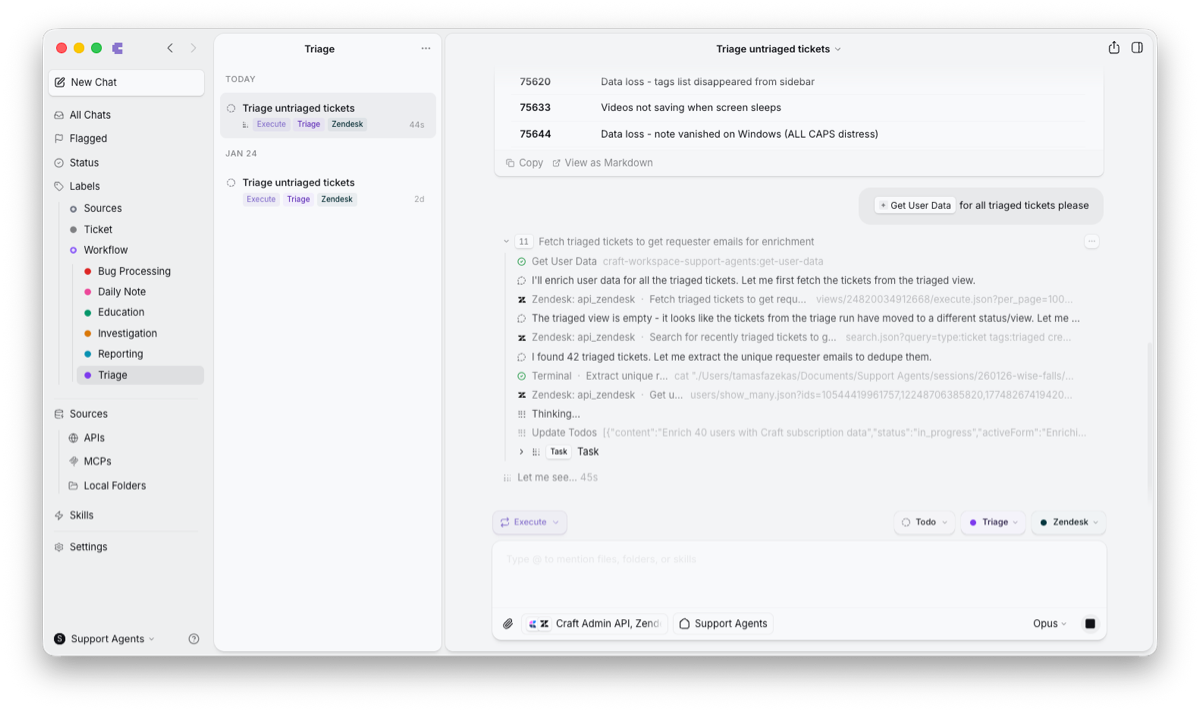
Data enrichments are used in almost every workflow. The customer support team defined a skill called “Get User Data”. It uses a Craft backend API to look up the user profile based on the user’s email in the Zendesk field, and adds the user’s plan type, billing status, feature flags (feature access), and usage metrics to the ticket.
The support agent no longer needs to open a separate tool to get all these details.
Bug processing workflow: issues reported faster, automatically to engineering
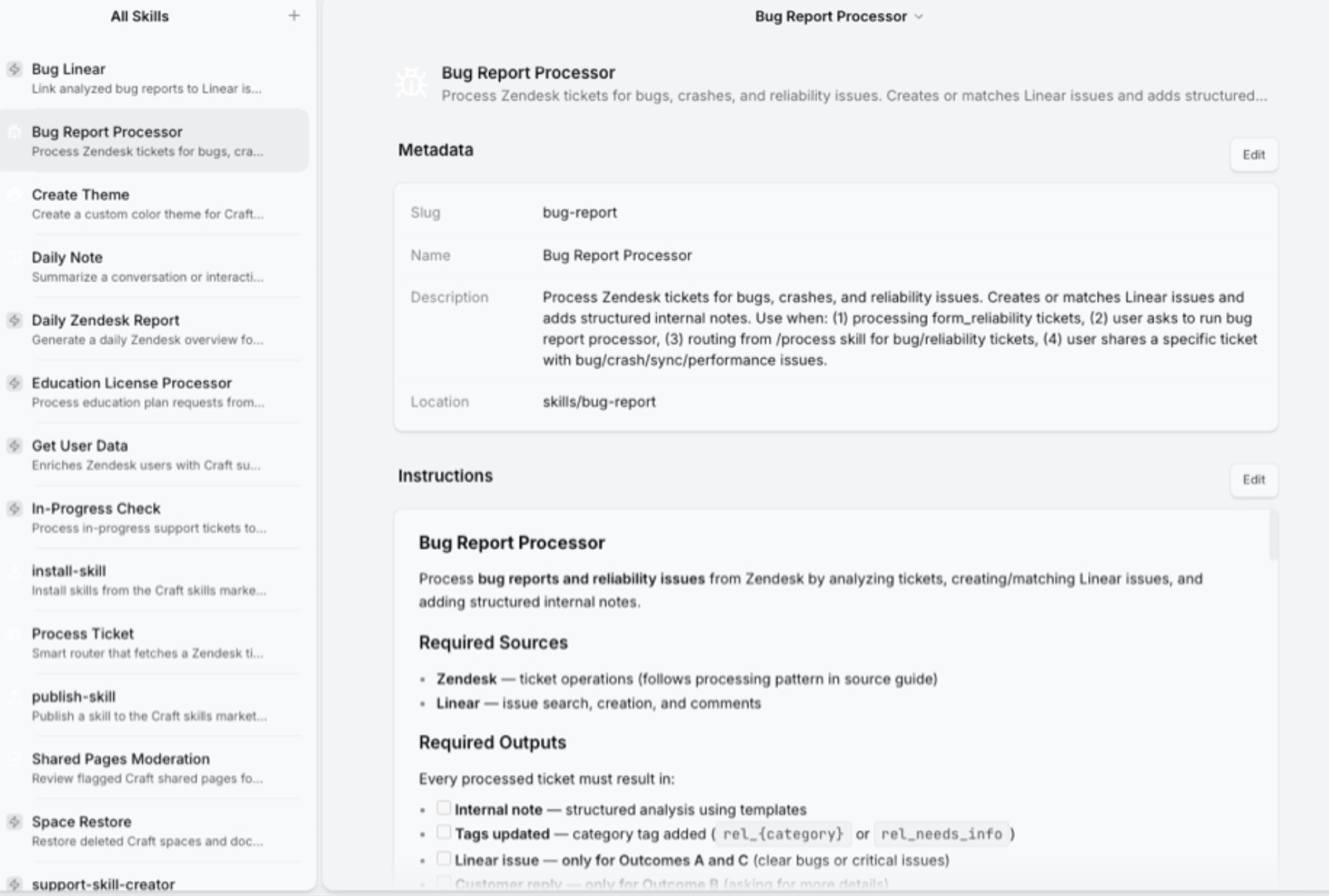
The “bug report processor skill” has greatly sped up dealing with bug reports. It’s similar to Claude Code’s skills feature. The skill defines data sources (Zendesk and Linear) and defines the required output (a structured analysis with tags and categories). It instructs the agent to:
Identify the platform and area which the bug belongs to, and tag it.
Crosscheck with Linear (Craft’s issue tracking system). If there are similar issues, link to that issue. If no similar issues are found, create a new issue and assign it to the relevant developer team.
Do a technical root cause analysis.
Draft a ready-to-send response for the customer.
Create engineering tickets for developers, including pointing to code references, where applicable.
Here’s how this skill is defined:
Below is an example of how it updates the Zendesk ticket with a suggestion on how the customer support agent should respond:
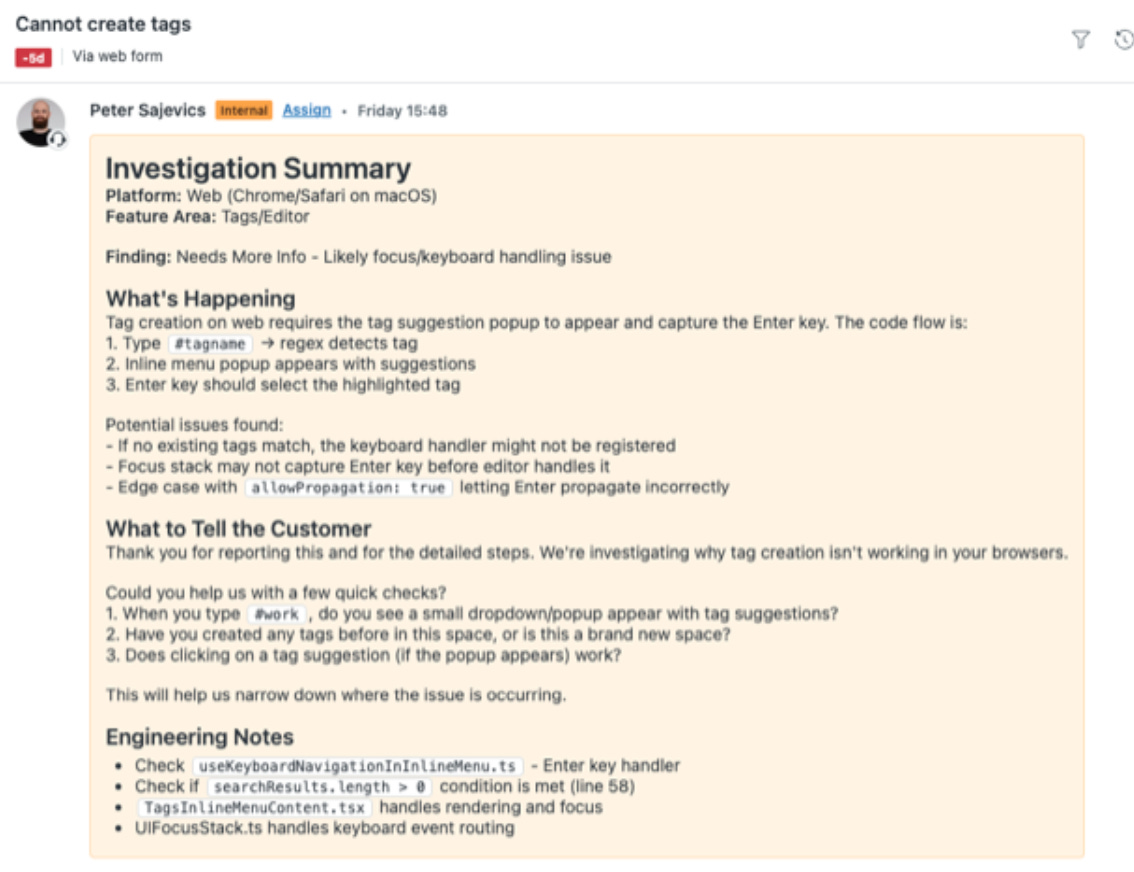
The customer support team have been pretty delighted about how their workflows have gotten better. Here’s Cusomer Experience (CX) lead, Peter Sajevics, on what’s changed:
“A massive win is we have to escalate so much less often than before! In the past, we would often have to ping engineers to check if a bug was a possible code issue. We no longer have to do this: the agent does it and automatically escalates when needed.
We no longer need to try to reproduce a bug on the latest version of the app which was reported on the old version because the code review lookup can tell us if anything relevant changed in the code paths.
We no longer need to look up subscription details in a separate tool because the agent fills in this detail.
I feel that tickets which used to take 20-30 minutes to process are down to 2-3 minutes.
My sense is that the biggest win is not even that we spend less time on each ticket, but that we can now process a much larger volume of tickets than before. Parallel processing of tickets is now much easier”.
Skills built by customer support
During just two weeks of using Craft Agents, the customer support team have built these skills:
/triage: categorize tickets with parallel workers
/bug-report: process bugs and create Linear issues
/education: handle education license requests
/daily-report: generate an overview of the current ticket queue with Zendesk as a source
/get-user-data: enrich the context with user details from Craft’s database
/feature-request: process feature requests, gather more info when needed, store requests in Craft for processing later
Use cases in other non-engineering teams
Today, all non-engineering teams at Craft are heavy users of the tool:
Marketing: building websites without devs. The marketing team builds lots of websites: pages to share details about launches, feature descriptions, comparison pages, and more. Previously, a web engineer would pair with the marketing team on rotation, and engineers dreaded this as unchallenging work, while marketing felt they had less support. But a marketing intern started to use Craft Agents to build new web pages and tweak existing ones, and now the whole team does.
HR: automating tedious work. An HR person built a Bamboo HR plugin to handle aged-based holiday allocations necessary for Hungary. Other automations include generating files compatible with the payroll system, which used to be done manually.
Finance: automating personal workflows. One person in finance built a tool that exports Revolut’s business account into CSV, then cross-references it with the employee Slack channel where employees post invoices, and matches these to create a format to submit to the accounting tool.
Additional permissions system to avoid accidents
The Craft team uses this tool for real, customer-facing work. But of course, LLMs are nondeterministic and can make mistakes which go on to cause problems in production. To deal with this, Craft Agents has an additional permissions system. Sessions can run in one of three modes:
Explore: readonly. The default mode for agents. They can read all sources but not write to them.
Auto: the agent can write to data sources without user input.
Ask to Edit: needs prior user confirmation. This mode is typically only used for onboarding – users often use Explore to discuss, and Auto to get work done.
When starting a new session, the default mode is “Explore”.
Engineers use Craft Agents – but less than non-devs
Some engineers have onboarded to Craft Agents, but most prefer Claude Code for the majority of product development work. The reasons that a few engineers prefer Craft Agents is its easier overview of parallel agent execution, and a more pleasant interface for reviewing lengthy code changes since scrolling is more convenient than reviewing on a terminal.
Creating custom themes
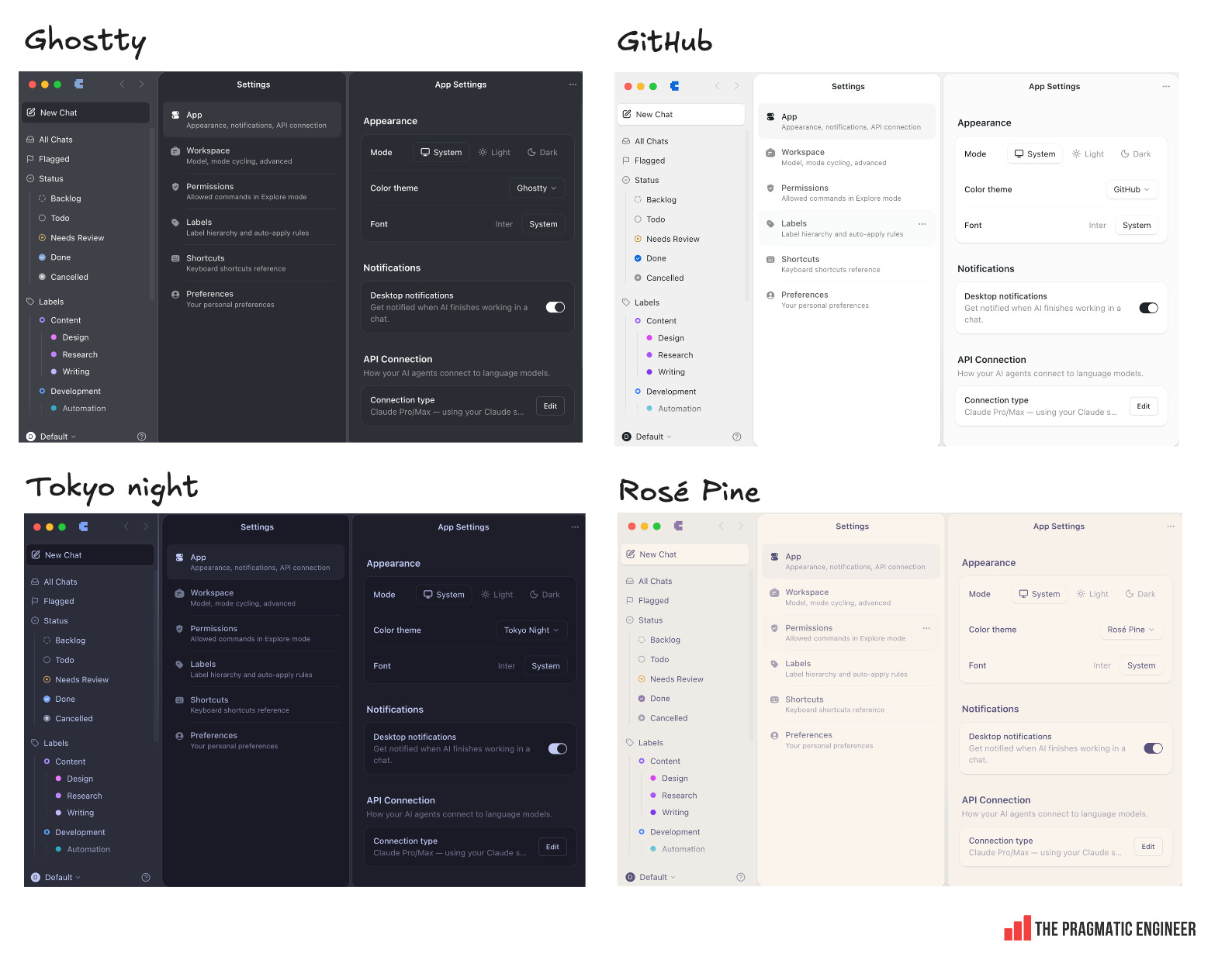
Craft Agents comes with several pre-built themes, like Ghostty, GitHub, Tokyo Night, Rosé Pine, and a dozen more:
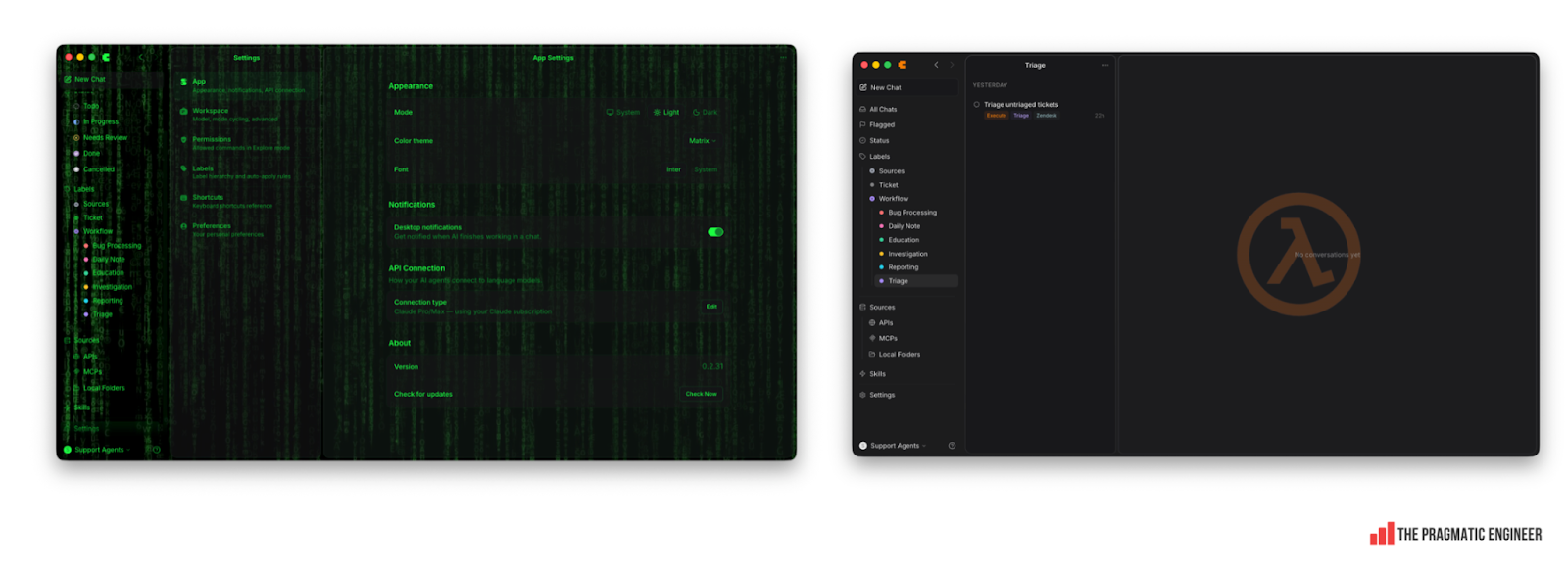
You might think this is enough choice, but it’s not! One customer support person instructed Craft Agents to design a new theme imitating the Matrix. The agent obliged, and custom themes started spreading in the office. Here are some popular ones:
“Remixing” Craft Agents is already a thing
Craft Agents is open source which means anyone can fork the code and make changes. The Apache 2.0 license is permissive: you can fork, modify, and distribute your fork however you want. The only constraint is that you must include a copy of the Apache 2.0 license text itself with the distributed work.
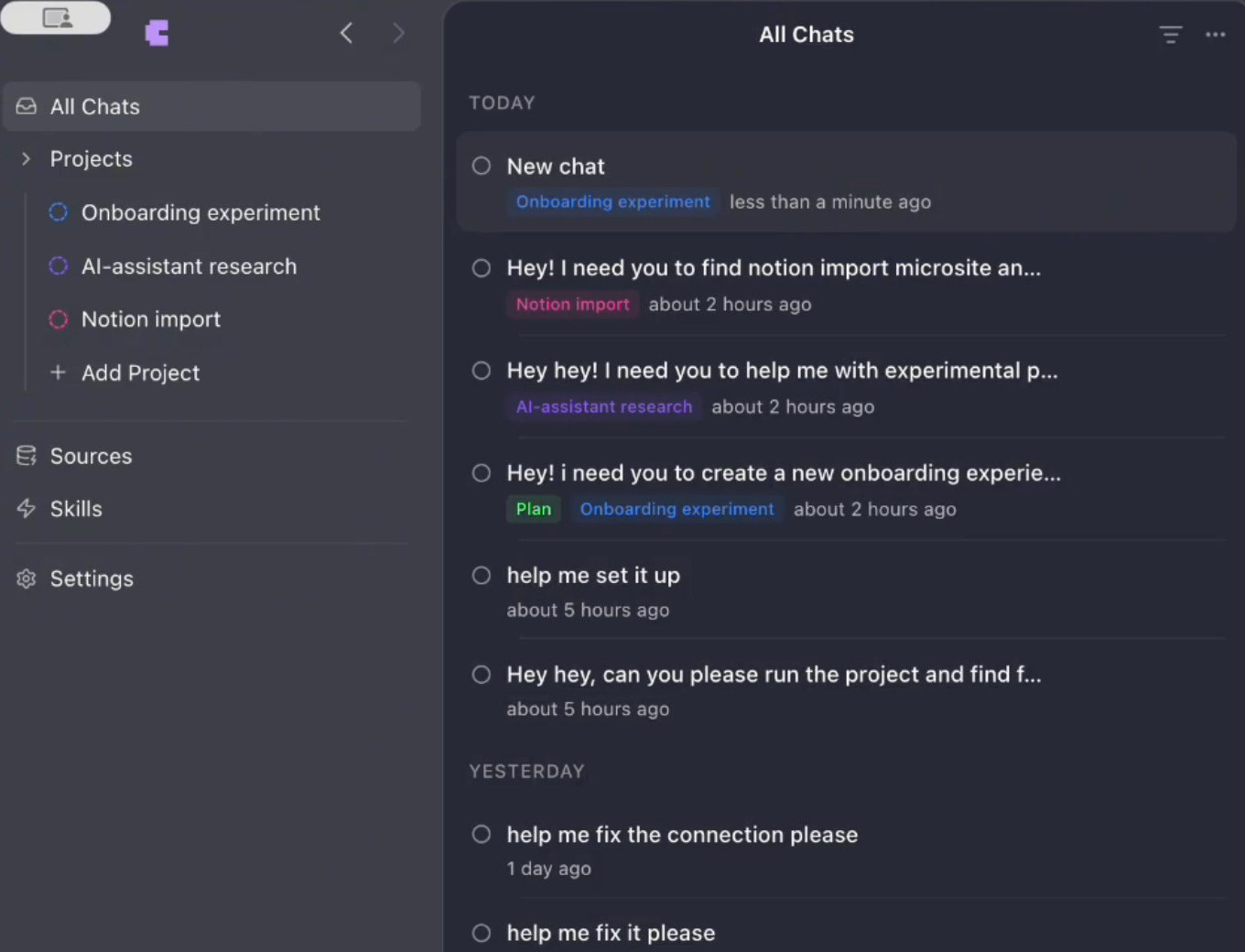
Forking and modifying for personal needs is already happening. Here’s an example from researcher, Lisa Skorobogatova, who remixed Craft Agents by instructing the agent to make changes to its own code to support projects, and allow drag-and-drop to move chats into projects:
4. New way to build software?
Until now, software at Craft was built the usual way:
Plan changes ahead of time when it makes sense to.
Write the code.
Code review.
Deploy to production.
But with Craft Agents, engineering is also done differently:
No code review process for product architects. Balint (who started the project) and Gyula Halmos (who joined early on) are the architects. They’re on the same page, have a strong understanding of the product’s direction, and can merge any and all changes without one reviewing the other’s work.
Devs at Craft can raise pull requests, but not merge them. An architect must review and approve, and most are approved, but for modifications that breach the product’s unwritten philosophy they request changes, and sometimes close the pull request.
There is less need for SDKs with AI. An interesting realization while building Craft Agents was that when AI is aware of API endpoints to call, there’s just not that much need for SDKs. For example, when Balint added support for Gmail to be used as a source, he originally wanted to use Google’s SDK, but realized that the agent has knowledge of the APIs to call, so they invoked the REST API.
This makes for simpler code and fewer dependencies. Note from Gergely: we previously did a deepdive on building great SDKs. It’s an open question whether AI agents will keep making use of SDKs, or if going direct to use REST calls will become common for AI-native engineering teams.
Externally, pull requests are rejected, but ideas are woven into the product. Despite Craft Agents being open source, Balint has merged very few of the pull requests submitted. Instead, he and the other architect study incoming PRs. They aim to understand which problem the PR solves, and look for signals from several people about an issue.
For example, in two days there were 5 different pull requests to add support for additional model providers (things like OpenRouter, ChatGPT, on-device models, etc). So, Balint took that as a signal that users wanted to add additional model providers, and implemented this functionality.
He said:
“Product coherence is becoming a silent advantage of standout products. If we took contributions as PRs submitted, the product would become a patchwork of local optimizations.
I realized that there is no point in attempting to merge pull requests. I prefer to use PRs as a high-fidelity feature request, and then redesign and rebuild the underlying feature so it fits Craft Agents, and scales for more use cases, not just one”.
5. Dev teams already seeing dramatic changes
On Monday, January 5, the Craft engineering team was told they’d have to change how they work because AI models had passed an inflection point that’s impossible to ignore. Each engineer got a Claude Max subscription to use for anything and everything they can think of.
This is a big change, and a top-down, mandated one. Balint was candid about the fact it’s a pretty tough time for engineers:
“I see every engineer and engineering team as being in one of the three stages:
Non-believers. Skeptical of AI’s potential for their work, thinking it might improve their own productivity at most by 50% or 100%, but with drawbacks. They do not believe it will ever be a 10x productivity improvement. There is no way to convince a non-believer by telling them about the potential, or showing your own work: they need their own “wow!” moment.
Believers. Those who have had a “wow!” moment when they saw a 10x productivity increase. They now seek other areas where they can replicate this massive productivity unlock.
Optimizer. Engineers who have started to use AI in everything they do, and are now incredibly productive. They work through bug backlogs, feature backlogs, and every other pre-defined work incredibly fast. Some engineering teams inside Craft now go through 100+ Linear issues per week, when previously the most they did was 15-20.
Of course, it takes time to move through each phase and we have teams and engineers currently in every one. After all, it’s only been three weeks since we started this change!”
The “what’s impossible?” challenge
Balint came up with an exercise to get more engineers to experience personal “wow!” moments with AI. Teams at Craft are made up of 3-5 engineers, and have two weekly meetings. At the first meeting of the week, Balint asks:
“Tell me an impossible goal. Something that would take at least 2-3 months to get done, which is objectively not possible to do in a week.”
The team usually comes up with a stretch goal at first; something that would probably take two or three weeks. Balint then pushes for ever more outlandish goals, until a truly impossible one comes up. Then he tells the team to throw every AI tool at it, and see if they finish by the end of the week.
And it works!
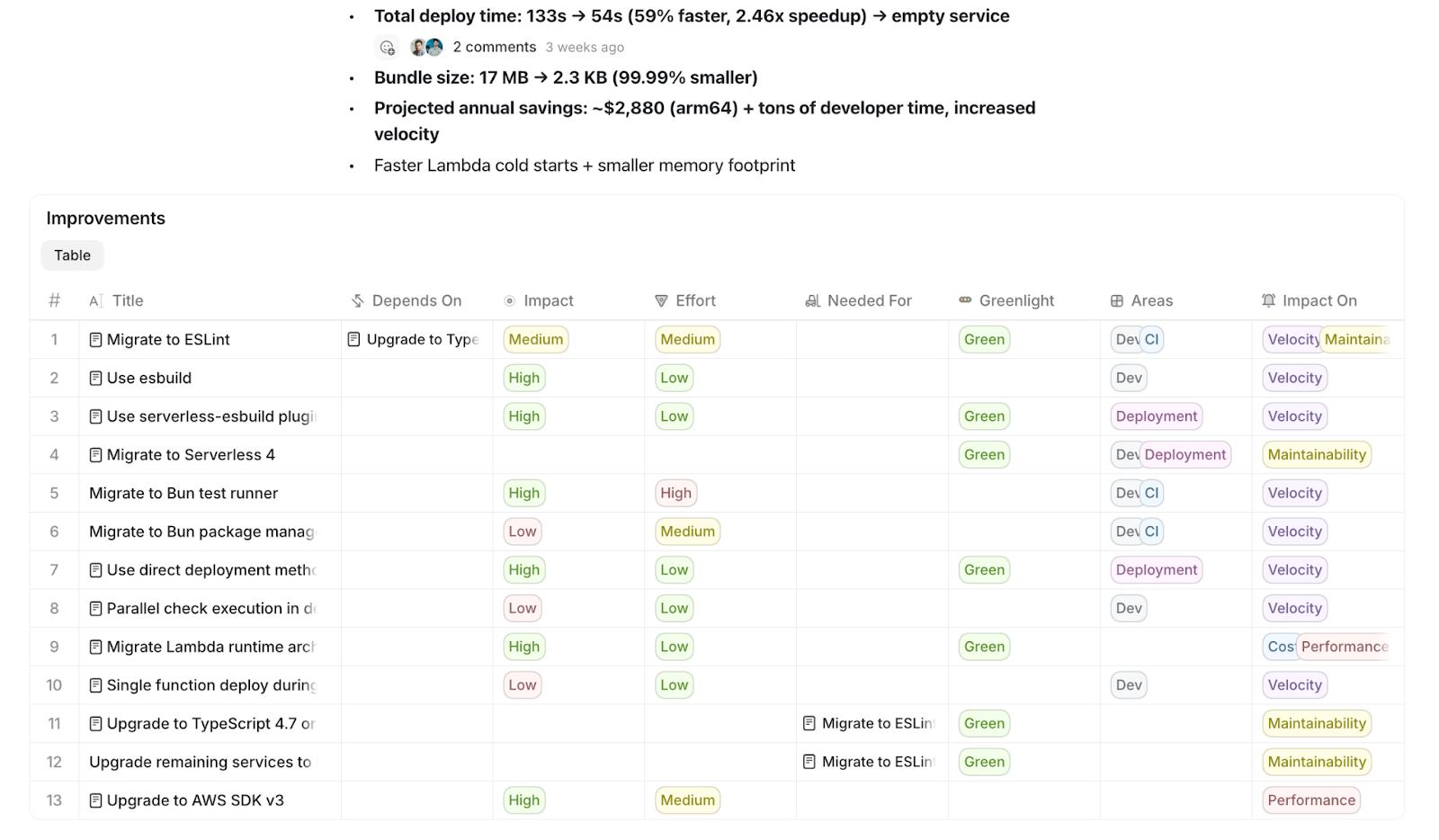
One team came up with the impossible goal of migrating 60 backend services to a new Serverless version (moving from Serverless 3 to 4), and make builds run faster. This was a dreaded project that the team had been delaying for 5 years(!!) The estimate was that it would take one or two devs up to 4 months to finish, at least.
In the end, a single engineer did it all in a week with Claude Code! They moved all 60 services to Serverless 4, migrated to Bun as the package manager, and deploy time dropped from 2.5 minutes to 1 minute. The projected annual compute resource savings are nearly $3,000!
The cost of models is, surprisingly, not an issue – at least not yet. Balint himself spends $3,000/month on top of the $200 Claude Max subscription, and is the heaviest user of tokens at Craft.
Everyone else – engineers and non-engineers – are on the $200/month subscription. When I asked if Balint’s worried about the cost of AI, he said he’s not. In fact, right now, he’s worried that others have not yet hit their $200/month limits. The team is at the stage of using tokens without thinking about cost.
One-person responsibility squads
Engineers are becoming end-to-end owners of areas. Typing out code is no longer taking up much time on the job and expectations are up, with engineers now expected to:
Define problems worth solving
Design systems
Own outcomes end‑to‑end
AI handles much of the implementation, but engineers are setting the direction, and make continuous course corrections.
With AI agents, an engineer can manage a group of 5+ agents running in parallel and delegate much of the implementation work to them. The role of an engineer increasingly resembles that of a tech lead or an engineering manager – except without the need to deal with people’s issues.
Engineering workflows will change
The engineering workflow is set to change at Craft, but it’s unclear how as yet. Balint’s own philosophy around AI usage is:
Use the best (most expensive) models and tooling to unlock orders-of-magnitude productivity gains.
Once unlocked, design a workflow around this more productive way of working.
The Craft team is in phase one: everyone is using the most capable models and finding out how the models boost their work. There will be time later to think about how to change workflows. Part of changing workflows comes pretty naturally by making changes to Craft Agents.
Devs’ struggles
Several engineers are struggling with the sudden change and there have been resignations, as a result. One engineer quit shortly after Balint’s AI mandate, who was one of Craft’s early engineers and one of the very few devs who knew the codebase inside out.
They resigned due to not being excited about using AI at work because they fundamentally love writing code, and the craft of solving problems and typing out solutions. Also, this engineer suddenly no longer felt valuable: before AI, dev colleagues sought their advice about the codebase, but with AI tools they just asked the AI agent and got the answer. Suddenly, no one needs a colleague with all the answers in their head. They assumed that if they quit, the handover would take months because they had accumulated so much knowledge.
Balint believes there are places that will keep working in the “old way”, where standout engineers like the founding engineer who quit will find job satisfaction.
Balint’s a very good coder himself: he started coding at the age of 12 and at 17 built his own 3D rendering engine from scratch. I asked how he feels about giving up writing code by hand:
“I always viewed code as a necessary tool I needed to get things out of my head.
Code was never the joy for me – touching the software was. When I was in ‘the flow’, I could type out 1,000-2,000 lines in one sitting which worked as I expected and generated high-quality UIs. And even then, I felt bottlenecked by my typing speed. I was thinking much faster than I was typing.
Because of this, I’m extremely happy because I can now prototype and iterate a lot faster”.
6. AI changes what software is worth paying for
Craft is in the business of selling software and Balint has thoughts about how software vendors must evolve, or face losing business from “AI-native” customers like what Craft is becoming.
Craft will probably move off Zendesk because they need an API-first backend, not a vendor pushing AI. Craft has used Zendesk for customer support for 5 years, but going AI-native will result in them leaving. Balint explained:
“Zendesk wanted to charge us $20,000 per year for an AI integration that – to me – did not feel powerful at all. Frankly, this was one reason I started to build Craft Terminal, and then Craft Agents: I figured we can do a lot better than this.
All our customer support flows now run through Craft Agents. We only use Zendesk as a backend.
I want us to move to an API-first customer support solution. It feels to me that Zendesk is a really complex UI, one that is really slow, has bad API hooks, and just keeps breaking our flow.
In general, I feel a lot of UI-first SaaS will be disrupted by API-first players. Once you have your own workflows via agents – like we do – the value of a custom, slow UI becomes a net negative. And I’ve been observing many traditional SaaS players locking down their APIs and making it harder to build integrations, and getting in the way of AI-native teams using them”.
Features that used to be enterprise capabilities are now baseline expectations for software with AI features. Previously, most SaaS vendors put enterprise-grade capabilities into their most expensive package, such as:
Audit logs for compliance checks
An API to build integrations outside of the UI
However, both these features are now baseline expectations for consumers:
Audit logs are necessary to be able to tell what an AI did. For example, how much of a code change was done by the AI, and did the dev override any of it? This is a must-have for any user of the software.
APIs and MCP servers are becoming must-haves for hobbyists to integrate tools into their workflow.
Balint predicts that vendors who keep such capabilities in their most expensive tiers will lose market share. There’s also the fair question that if enterprise capabilities move to consumer plans, what will it mean for enterprise pricing?
Much less vendor lock-in. AI makes it easier to migrate to new vendors, including for infrastructure. Craft itself has been an AWS customer from the start, and would not consider moving to another provider because AWS is what their team knows how to deploy on. But with AI, it’s becoming far easier to migrate infrastructure to another provider; be that another large cloud provider or a smaller startup. What used to be a months-long migration project is now much less of an engineering effort.
7. Predictions for the tech industry
Balint told me that in his 20+ years in software, what’s playing out now with AI is the single biggest change he’s seen. I asked what developments he foresees for the tech industry:
“Open source: the death of pull requests, and spread of “remixed software.” Contributions as pull requests are rarely ever merged inside Craft Agents. Code changes are made by the architects of the product, who might take inspiration from PRs but who deliberately put themselves in charge of UX changes, architectural decisions, and implementation details.
While fewer PRs might be accepted, it’s now easier than ever for anyone to fork an open source project and “remix” it. Nontechnical users can instruct an agent to make a specific change to the code, and then just use this fork – fully bypassing the process of trying to get their PR request accepted!
Those who value the impact of their work thrive, while those who love the craft of coding may struggle. This is the dynamic Balint observes in Craft’s engineering team. AI puts the craft of writing code in the back seat, but can also multiply a single engineer’s business impact.
Engineering careers will probably have to change. Until now, an engineering career ladder looked like this in many workplaces:
Software engineer
→ Senior engineer
→ Team lead / engineering manager
→ Director of engineering
With AI, a single engineer can now take on projects that used to require a team lead and a team of engineers. Suddenly, every engineer has the capability to work at team-lead level. It’s possible the career ladder will flatten, engineers will take on more responsibilities, and there will be fewer managers and directors.
We are freezing hiring until we figure out what type of people we need to hire for the future. After six years, it feels like Craft has been re-founded in the sense of how we work. Everything is changing in our day-to-day work despite our core business and customers staying the same.
I want to expand the team, but we first need to figure out our new way of working. And frankly, when we start to hire again, we will probably look for very different skillsets than before. One thing is for sure, we will only onboard people who are “believers” or “optimizers” when it comes to using AI at work”.
The tech industry could be divided between engineers who work in an “AI-native” way, and those who don’t. Gyula Halmos is the other architect on Craft Agents. He spent 15 years at large companies – including working on self-driving – and joined Craft in November. It’s his first startup experience and he has been working in this “AI-native” way pretty much since day one. He told me something interesting:
“After working in this AI-native way, I just don’t think I could go back to how I worked before. The world where we plan a project for a week, code it for a month, and release it in another month: even if they offered me double what I earn now, I just don’t think I could go back to that pace of work”.
An irony is that companies that could offer to double an engineer’s compensation are probably not those which work in the “traditional” way, but rather are places where engineers are so much more productive due to being “AI-native.” This could create a situation where “AI-native” engineers are less willing to work at companies which don’t work this way, and anyway, would take a hefty pay cut if they did want to join.
So, over time there may be less overlap between these two groups, if traditional companies become unable to hire from “AI-native” places, which themselves have no reason to hire from traditional businesses.
Takeaways
Thanks very much to Balint, Gyula, and Tamas at Craft for sharing so much detail on exactly how they work today. As a reminder, Craft Agents is free and open source; all you need is an AI subscription with a popular provider to use it. As a note, you can meet Balint next month, on February 11, at the Pragmatic Summit in San Francisco.
This week, I reached out to a few founders and CTOs of tech companies to check if the radical change at Craft is a one-off, or potentially the start of a trend. Based on their responses, it does indeed seem like a sign of something bigger.
Around half the people I pinged said they are making massive changes to how engineers work, and are pushing AI tools top-down after having their own personal “holiday period inflection point” or “wow!” moment. They are also seeing far more enthusiasm from individual contributors than before.
I’m pretty sure tech companies will undergo major transformations, and this is starting now. The change is happening for the same reason that more engineers no longer write code by hand: the agents have passed an inflection point at which they become genuinely useful.
Tools that help agents get feedback – CLIs like Claude Code, Codex, and similar – have been a big boost. We’re seeing the spread of a new generation of AI tooling with pleasant UIs; Craft Agents is one example, Claude Cowork another, and I’m sure many will follow.
The biggest surprise for me is how much non-engineers have embraced agents at Craft – and the impact this has on engineering. Marketing used to have a hard dependence on engineering to build websites, but now they do it on their own! The impact of this single change is that engineers no longer dread being assigned “marketing duty”, and instead work on more ambitious projects.
Also, customer support no longer has to escalate to engineering; instead, an agent does it automatically. The outcome is fewer interruptions and not missing customer complaints. Fewer interruptions mean more opportunity to do deep work and take on ambitious tasks. This benefit derives from other disciplines using more AI tools – it’s truly fascinating.
Why not take inspiration from what the Craft team is doing: set yourself an “impossible” goal that seems impossible to do in a week. Then purchase access to the best models for a tool like Claude, Codex, Manus, Factory, etc, pay the up to $200/month cost as a one-off, and then throw everything at it. How far will you get?
If you’re a manager in your workplace, make the case for every engineer to have access to the best models so they can complete their own “impossible project,” or at least see how far they can go.
This year is shaping up to be one of massive change and within a few months, lots of startups may be operating very differently to how they used to. Of course, there are fundamentals that don’t change, even when output becomes more rapid. It still takes as much time as ever to close sales, get customers used to a new tool, etc.
This deepdive has covered the upsides of moving to an “AI-native” workflow, but there will inevitably be downsides which emerge later. I’ll be keeping a pulse on these changes as they unfold and share them with you as they happen. Meanwhile, feel free to leave a comment on how AI agents are changing the way you work in 2026!
So much to relate to here:
0/ This is reminiscent of all these people building personal life management systems in Obsidian :)
1/ Agent orchestration and communication with humans will be the theme for 2026. Finding the right level of integration: yesterday's manual point and click, to something like Craft, all the way to Gas Town.
2/ This past week I saw how hard it was to convince even professional SWEs with real experience how valuable agentic coding is. Seems like no amount of articles or other people's experience will help.
Very good overview of a thoughtful AI-implementation. I hope we trend further towards this avoidance of "Copilot everywhere" haha